Table of Content
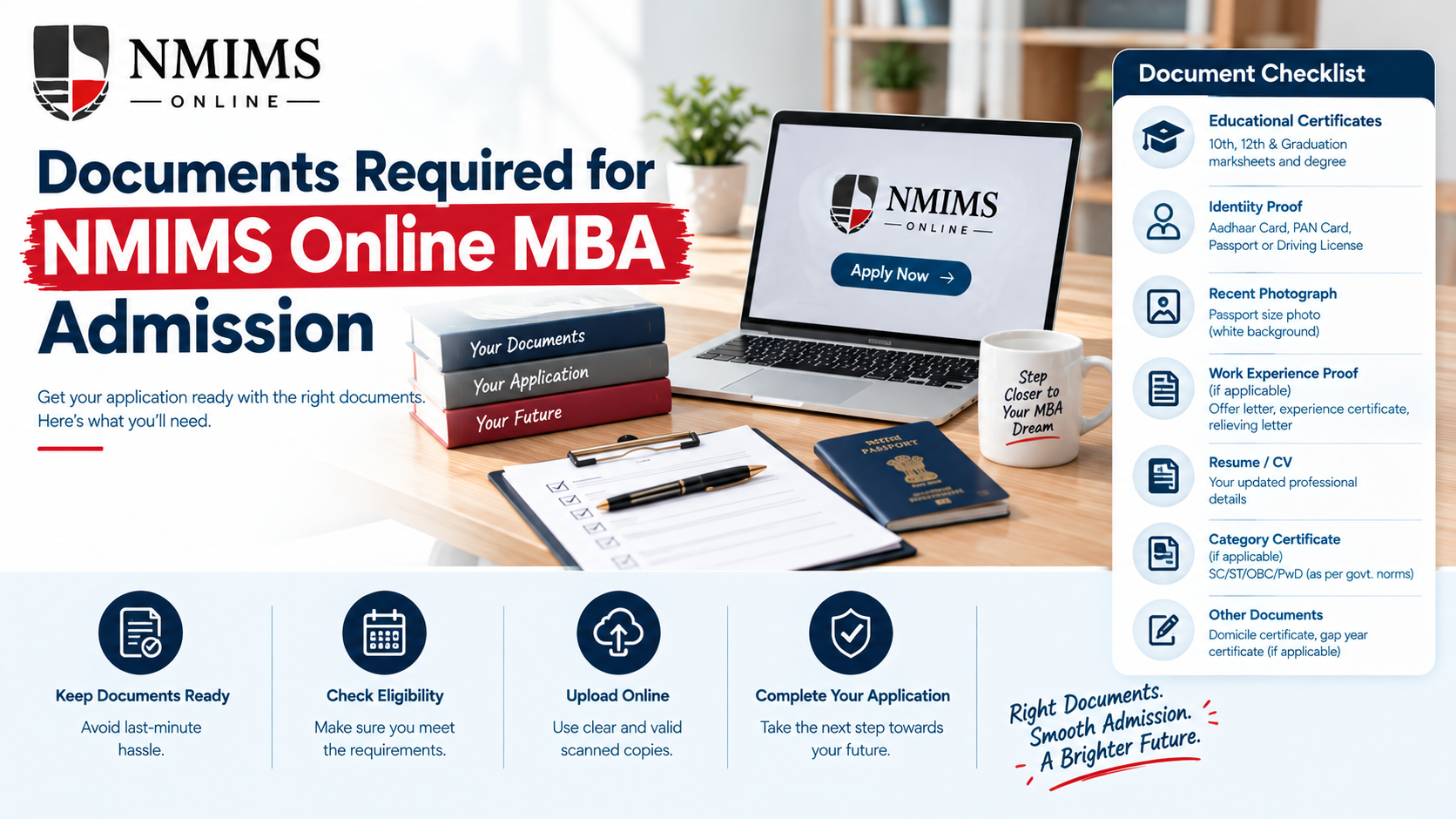
The NMIMS Online MBA documents required are grouped into three categories: academic documents, photo identity and a passport-size photograph. NMIMS also refers to uploading attested photocopies. The public page does not name every file for every applicant, so the live application portal must be checked for the exact document-level list.
Prepare clean, readable records before registering. Document approval is one of the conditions for admission confirmation, along with payment approval and student verification.
Official NMIMS Online MBA Document Categories
| Official category | What it establishes |
|---|---|
| Academic documents | Graduation eligibility and education history |
| Photo identity | Applicant identity and personal-detail match |
| Passport-size photograph | Applicant image for the admission record |
| Attested photocopies | Verification status of submitted copies; confirm the current attestation method |
Why Document Verification Matters
The MBA Online eligibility rule requires a recognised bachelor’s degree under the 10+2+3 pattern, or an equivalent degree recognised by the Association of Indian Universities. The current marks threshold is 50%, with 45% published for SC, ST, OBC and PwD applicants.
Documents allow NMIMS to verify:
- The applicant’s identity
- The awarding university
- The programme and qualification level
- Graduation result and marks
- Passing status and year
- Whether a claimed category relaxation is supported
- Whether names and dates are consistent
- Whether an equivalence decision is needed
Uploading a file does not mean it has been approved. Admission is confirmed only after document approval, payment approval and student verification.
Academic Documents to Prepare
Graduation marksheets
Prepare all marksheets or the consolidated transcript that clearly shows the subjects, marks or grades, result and awarding institution.
Check that:
- Every semester or year is represented where required.
- The scan includes the complete page.
- The university name is visible.
- The result status is readable.
- Marks have not been edited or enhanced.
- The file order is logical.
Degree or provisional certificate
A final degree certificate establishes that the qualification was awarded. A provisional certificate may be relevant when the final degree has not yet been issued, subject to the portal’s rules.
Do not assume that a marksheet alone always replaces the degree certificate.
Class 10 and Class 12 records
These records are commonly used in university applications to establish the education sequence, name and date of birth. The public MBA page does not explicitly itemise them under its short document list, so confirm whether they appear in the active application checklist.
CGPA-to-percentage evidence
If the graduation record uses CGPA, the application may need a percentage conversion. Use the conversion rule issued by the degree-awarding university.
Keep one of the following when applicable:
- An official conversion certificate
- The conversion formula printed on the marksheet or transcript
- A university regulation or authorised document showing the formula
Backlog or supplementary result records
If a final result includes cleared backlogs or supplementary examinations, prepare the complete record that shows the current passing status. Do not omit a marksheet merely because it contains an earlier failed attempt if the portal requests the full sequence.
AIU equivalence evidence
An applicant with a foreign degree or a qualification that does not fit the standard pattern may need equivalence from the Association of Indian Universities. The eligibility wording specifically refers to an equivalent degree recognised by AIU.
Equivalence is profile-specific. Confirm the requirement before paying a non-refundable or time-sensitive charge.
Start Your Journey
Need Help Picking the Right Fee Route?
Talk to our admissions team about tuition options, complete cost and how each route affects your cash flow.
Photo Identity Documents
The process requires photo identity but does not name the accepted IDs on the public MBA page. The active portal should be treated as the authority for acceptable proof.
Before upload, confirm that the selected ID:
- Is among the options accepted in the portal
- Is current where validity applies
- Shows a clear photograph
- Shows the full name and other required details
- Is scanned on both sides if both contain relevant information
- Does not have glare, blur or cropped edges
Passport-Size Photograph
The public process lists a passport-size photograph. Use a recent, clear image with a plain background unless the portal specifies another format.
Practical checks:
- Face is clearly visible.
- Image is upright.
- Lighting is even.
- No strong filters or editing are used.
- File type and size meet the portal limits.
- The image is not a screenshot with extra borders.
- The photograph represents the current applicant.
Do not stretch a small image to meet dimensions. Resizing can make the photograph blurred.
Category and Relaxation Evidence
NMIMS currently publishes a 45% graduation threshold for SC, ST, OBC and PwD applicants, compared with the general 50% threshold. An applicant using that relaxation should be ready to provide valid supporting evidence in the form and format required by NMIMS.
The public MBA page does not specify the complete category-certificate rules. Confirm:
- Accepted issuing authority
- Required certificate format
- Whether a validity period applies
- Whether a current certificate is needed
- Whether additional declarations are required
Do not select a category merely because the marks are below the general threshold. The claim must be accurate and supported.
Name-Mismatch Documents
Names may differ because of spelling, initials, marriage, legal change or ordering conventions. A mismatch can trigger verification questions even when all records belong to the same person.
Examples include:
- “Amit Kumar Sharma” on the degree and “Amit K Sharma” on the ID
- A surname added after marriage
- Initials expanded on one record
- Different spacing or transliteration
- A typing error in one marksheet
Address, Nationality and Additional KYC Records
The public MBA document list mentions photo identity rather than a separate address-proof category. However, the application may collect address, nationality or other KYC information.
Keep relevant records available, but do not upload extra sensitive documents unless requested. More documents do not automatically make an application stronger; they increase the amount of personal information shared.
Are Work-Experience Documents Required?
Work experience is not compulsory for the standard MBA Online programme. The MBA Online process lists academic documents, photo identity and a passport-size photograph.
Do not copy the MBA Working Executive document list into an MBA Online article. The executive programme has different eligibility and may require work-experience evidence and a personal interview.
An applicant may still provide professional information if the form asks for it, but that should not be described as a universal MBA Online eligibility document without current confirmation.
Is an Entrance-Exam Scorecard Required?
MBA Online eligibility and registration process do not list NMAT or another entrance examination. Therefore, an entrance scorecard should not be presented as a standard required document for this programme.
NMIMS has several programmes with different admission routes. Always check that the page refers specifically to MBA Online.
Document Preparation Standards
Scan quality
Use a scanner or a careful mobile scan. Text should remain readable when the reviewer zooms in. Avoid dark backgrounds, fingers, folds and reflected light.
Complete pages
Do not crop seals, signatures, serial numbers or instructions. Include the back side when it contains marks, verification information or conditions.
File naming
Use simple, descriptive filenames such as:
- Graduation_Semester_1.pdf
- Graduation_Consolidated_Marksheet.pdf
- Degree_Certificate.pdf
- Photo_Identity.pdf
- Passport_Photograph.jpg
Avoid vague names such as scan1-final-new.pdf.
File size and format
Use the file type and maximum size shown in the portal. If compression is needed, reopen the compressed file and confirm that marks, seals and small text remain clear.
Page order
Place multi-page academic records in chronological order. A reviewer should not have to search for the final result among random pages.
Authenticity
Never alter a mark, result, seal, signature, date or identity detail. A visually cleaner false document remains false and can lead to rejection or further action.
Attestation: What Applicants Should Confirm
Upload “Gazette Attested photocopies.” Since the wording is not a detailed operational instruction, ask NMIMS:
- Does the active intake require attestation by a gazetted officer?
- Which documents must be attested?
- Must each page be signed and stamped?
- Is self-attestation accepted anywhere?
- Can digitally issued records be uploaded without physical attestation?
- Are colour scans required?
- Is later submission of originals required?
Do not obtain unnecessary attestations based on a third-party article. The live process can change.
Upload Checklist Before Submission
- The correct applicant’s document is selected.
- Full name is readable.
- University or issuing authority is visible.
- Marks, grades and result status are clear.
- All required pages are present.
- Both sides are included where relevant.
- File type and size meet portal rules.
- The file opens after upload.
- Attestation requirements are satisfied.
- No password protects the PDF unless the portal permits it.
- No page belongs to another person.
- No sensitive extra record is included accidentally.
What Happens After Document Upload?
The application moves through review rather than instant approval. The status may show that documents are submitted, under review, approved or require correction.
If a correction is requested:
- Read the exact reason.
- Replace the correct file, not the entire application unnecessarily.
- Keep a copy of the revised upload.
- Respond within the stated period.
- Check the status again.
Common Document Problems and Fixes
| Problem | Safer response |
|---|---|
| Blurred marksheet | Rescan the original at a readable resolution |
| Cropped seal or signature | Scan the entire page again |
| Name mismatch | Ask which legal supporting record is accepted |
| CGPA without percentage | Use the awarding university’s conversion evidence |
| Missing final degree | Confirm whether a provisional certificate is acceptable |
| Multiple files where one is allowed | Combine in order and verify readability |
| Oversized PDF | Compress carefully and reopen before upload |
| Wrong programme checklist | Confirm the page says MBA Online |
| Unclear attestation rule | Get written clarification from admissions support |
| Debit completed but status pending | Save evidence and contact support before paying again |
Privacy and Document Safety
Academic and identity records are sensitive. Protect them throughout the process.
- Use the NMIMS website or authorised application route.
- Check the web address before upload.
- Do not send identity documents to unknown numbers.
- Do not share passwords or OTPs.
- Remove scans from shared devices after use.
- Keep local copies in a protected folder.
- Avoid public Wi-Fi for identity and payment submission.
- Share only the documents required for the application.
Conclusion
The NMIMS Online MBA document categories are simple, but the details require care. Prepare readable academic records, an accepted photo ID and a current photograph. Resolve CGPA conversion, name mismatch, category and equivalence questions before submission. Most importantly, follow the live portal for the exact checklist and wait for document approval before treating admission as confirmed.
Frequently Asked Questions
NMIMS publicly lists academic documents, photo identity and a passport-size photograph. The application portal provides the exact file-level requirements for the active intake.